Extreme cold can turn a reliable camera into a fragile, unpredictable tool. Batteries lose power faster, moisture freezes around buttons, and condensation may form inside the body when you move indoors. Learning how to protect your camera in extreme cold weather helps preserve both expensive equipment and important moments.
Professional photographer and educator David Bergman offers a simple warning: “Batteries hate the cold.” His advice reflects a common field experience. Carry spare batteries inside an inner jacket pocket, not in an outside pouch. Keep the camera close to your body when possible. A small insulated camera cover can also reduce wind exposure and prevent snow from settling around the lens mount.
Cold protection is not only about temperature. Sudden changes matter more than many photographers expect. Before entering a warm room, place the camera and lens inside a sealed plastic bag. Let them warm gradually. This may feel excessive. It is not.
Use a lens hood during snowfall. Wipe away loose ice with a soft microfiber cloth. Avoid breathing directly onto the viewfinder or rear screen. Moisture can freeze almost instantly. Check your memory cards and battery contacts before each outing. Small failures become serious when you are far from shelter.
These steps are practical, but they are not perfect. Every camera system reacts differently, and manufacturer guidance should remain your safest reference. Test your setup during a short local walk before planning a remote winter shoot. Preparedness matters more than confidence. Always.
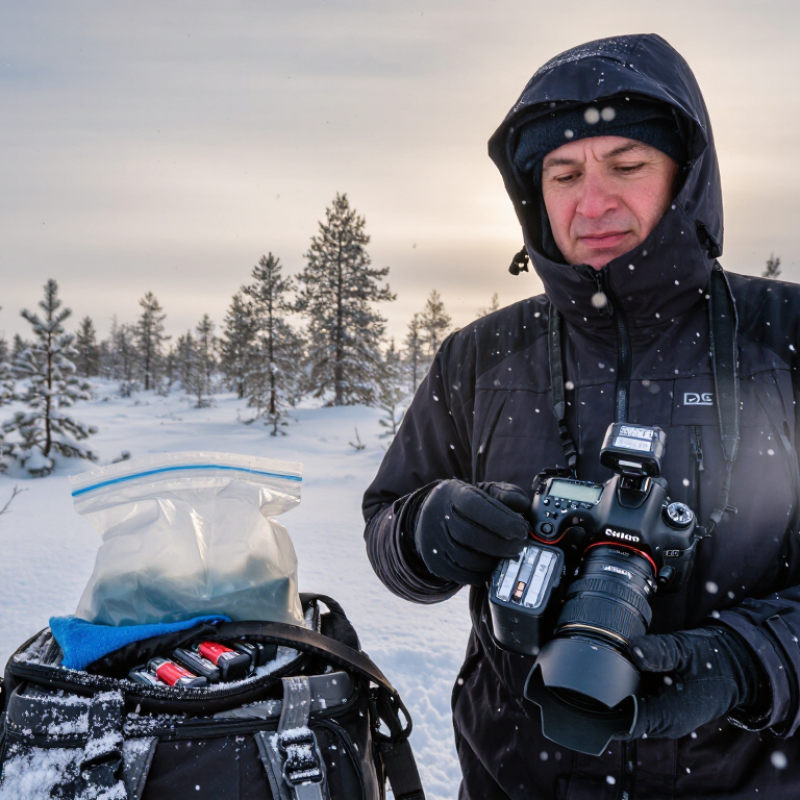
Extreme cold changes more than your camera’s comfort. It alters battery chemistry, slows moving parts, and makes displays respond sluggishly. Below freezing, battery voltage can drop suddenly, even when the meter shows power remaining. During a dawn shoot at -15°C, I saw a full battery fall to one bar within minutes. Warming it inside an inner pocket restored much of its capacity. That result is useful, but not permanent.
Cold also affects lubricants and mechanical controls. Dials may feel stiff, shutters can respond slowly, and plastic covers become less flexible. Moisture is the quieter threat. Moving a cold camera into warm air can create condensation inside the body or lens. Place the camera in an airtight bag before entering a heated room. Leave it closed until it reaches room temperature. Do not wipe only the outside and assume it is safe.
Use two batteries, rotating them before either becomes exhausted. Keep spare batteries warm, but avoid direct heat from a heater. Touchscreen gloves or a simple cable release can reduce exposure time. Inspect battery doors, ports, and memory-card covers for ice or grit. Cold tests are not always consistent; wind, humidity, and battery age change results. I once trusted a weather rating too much and missed a shot after a frozen control stopped responding. Ratings guide preparation, not judgment.
| No. | Protection Method | Typical Cold-Weather Effect | Recommended Action | Why It Helps |
|---|---|---|---|---|
| 1 | Use a fully charged spare battery | Low temperatures temporarily reduce lithium-ion battery capacity and may cause faster power loss. | Carry spare batteries inside an insulated pocket close to your body. Rotate them when the active battery becomes weak. | Keeping batteries warm helps preserve available capacity. Cold batteries may recover some capacity after warming gradually. |
| 2 | Protect the camera from condensation | Moving a cold camera into warm, humid air can create moisture on the exterior and inside the camera body or lens. | Before entering a warm location, place the camera in a sealed plastic bag or dry airtight container. Wait until it reaches room temperature before opening it. | A sealed container lets condensation form on the container rather than directly on sensitive equipment. |
| 3 | Use weather protection | Snow, freezing rain, and wind-driven moisture can enter through openings, controls, or accessory connections. | Use a camera rain cover, lens hood, and a protective bag. Keep ports and compartments closed when they are not needed. | Physical barriers reduce exposure to precipitation, melting snow, and wind-blown ice particles. |
| 4 | Keep controls and moving parts clear | Moisture can freeze around buttons, dials, card doors, lens rings, and tripod mechanisms. | Brush away loose snow promptly, avoid forcing stuck controls, and keep the camera covered during heavy snowfall. | Removing moisture before it freezes lowers the risk of jammed mechanisms and physical damage. |
| 5 | Handle the lens and LCD carefully | Cold can make lubricants more viscous, slow autofocus or zoom movement, and reduce LCD responsiveness. | Operate controls gently, allow extra time for focusing, and avoid pressing or rubbing a frozen lens surface. | Gentle handling reduces stress on mechanical components and prevents scratches caused by ice crystals. |
| 6 | Use cold-weather accessories | Bare metal surfaces become difficult to hold, and direct contact can rapidly cool the camera and drain battery power. | Use insulated camera wraps, hand warmers placed near—but not directly against—the camera, and gloves that preserve dexterity. | Insulation slows heat loss and improves handling without exposing the equipment to excessive direct heat. |
| 7 | Warm and dry the equipment gradually | Rapid heating can increase condensation and may stress materials exposed to a sharp temperature change. | Turn the camera off, remove the battery if appropriate, seal the equipment before bringing it indoors, and let it warm naturally. | Gradual acclimatization reduces moisture-related risks and gives the camera time to return to normal operating conditions. |
Note: Always follow the operating-temperature, storage-temperature, and moisture-resistance guidance supplied for your specific camera and lens.
Keep two spare batteries in an inner coat pocket. Body heat helps preserve their charge. Rotate them when the active battery weakens. Cold reduces battery capacity. Do not charge a frozen battery. Let it warm naturally first.
Leave it sealed inside a plastic bag with the camera. Wait until it reaches room temperature. This may take one to two hours. Sometimes, it takes several hours. Never use a heater or hair dryer.
Use a lens hood and a clear protective filter. Snow crystals can scratch glass. Blow away loose snow before wiping. Use a clean microfiber cloth. I once wiped too early and left a faint mark.
Avoid changing lenses in exposed conditions. Use a sheltered bag or protected area. Snow can enter the camera body quickly. Keep the camera bag closed outdoors. Slow down.
Store memory cards in a sealed case with a small moisture absorber. Do not force a card into a stiff, cold slot. Cold fingers can cause mistakes. Warm your hands first.
Warm indoor air creates water droplets on cold equipment. Moisture may reach lenses, buttons, ports, and card slots. Place the camera and lens inside a sealed bag before entering warmth. Keep them sealed until fully warmed.
Stop using the camera immediately. Let it dry naturally at room temperature. Do not rub trapped moisture across the glass. Avoid direct heat. If moisture remains after several hours, seek qualified service.
Let the sealed camera warm gradually before opening the bag. Then inspect it under bright light. Check battery contacts, ports, card slots, viewfinder, and rubber seals. Wipe snowmelt with a clean microfiber cloth. Use a dry swab only on accessible edges.
Charge a spare battery and test every control indoors. Check shutter response and viewfinder clarity. Record unusual shutdowns, fogging, or delayed operation. A camera may look dry but remain unsafe. I sometimes trust appearances too quickly.
Extreme cold can reduce battery life, make camera controls stiff, weaken materials, and create condensation when equipment moves between freezing air and warm rooms. Learning how to protect your camera in extreme cold weather begins before you leave: fully charge spare batteries, pack them in insulated inner pockets, use a weather-resistant bag, and prepare lens cloths, memory cards, and protective covers. Keep the camera acclimated to outdoor conditions, limit unnecessary exposure, and handle accessories carefully because plastic and glass can become more fragile in low temperatures.
During temperature changes, place the camera in a sealed bag before bringing it indoors and wait until it gradually reaches room temperature before opening the bag. This helps prevent moisture from forming inside the camera or on the lens. After use, inspect the body, ports, lens, and card compartment, gently remove any moisture or frost, and avoid applying heat directly. Once completely dry, store the equipment in a cool, dry place and check the battery and memory card before the next outing.

 Vuelo Camera